How to Use Google Wiki

Hello, did a quick search for this online hope this helps. You just need to turn that setting off so it doesn't hibernate or sleep after a period of time of not being on it. Here's the instructions, let me know if it worked for you! have a great day!!

Here's the link: Even describes why yours doesn't wake up!

http://www.ezinstructions.com/sleephibernat.html

1) Right-click on the "desktop" anywhere there is no icon. (The desktop is the main screen where you see the Recycle Bin, My Computer, My Documents, etc. icons.)

2) Click on Properties.

3) Click on the Screen Saver tab.

4) Click on the Power… button.

5) Click on the Down Arrow next to whatever is in the Power scheme box, then click on Always On.

6) You should then see the settings under Plugged in change for Turn off monitor, Turn off hard disk, System standby [Sleep] mode [and Hibernation mode]. Be sure that the settings for all of these say "Never."

Note: You can change Turn off monitor to After 20 mins if you want to turn off your monitor to save electricity. The monitor will turn on again automatically when you move the mouse or press any key. This feature usually works without any problems.

7) Click on the Hibernate tab, then click to remove the check mark next toþ Enable hibernation if there is one.

8) Click on OK.

9) Click on OK.

10) Close all open programs, then restart the computer for the new settings to take effect.

Google has a solid amount of cash in its pockets, but with all the recent lawsuits against YouTube one has to wonder if it's time to salvage whatever videos you like from the service and save them somewhere where evil attorneys won't look - your hard drive.

Luckily, there are literally dozens of tools for downloading videos from YouTube and/or converting those YouTube videos to some format other than .flv. It's hard to pick the best one, as they all have pluses and minuses. Thus, we've chosen 23 YouTube downloader tools we've found to be actually working. Here they are, categorized according to the platform they work on:

Web based

1. YouTubeX doesn't have a lot of options, but it's simple, and it works. It also enables you to share the YouTube video with your friends via e-mail. Unfortunately, all the files are called get_video, and you have to add the .flv extension manually.

www.youtubex.com

2. KeepVid is another simple site. No hassle, works not only for YouTube movies but for a number of other sites, including Google Video, MySpace Video, DailyMotion and others. Again, you have to add the .flv extension by hand.

keepvid.com

3. VideoDownloader is very similar to KeepVid, but supports even more video sharing sites, and it's also available as a Firefox extension. Just like with KeepVid, all downloads are in .flv format. We recommend MediaCoder for free conversion.

javimoya.com/blog/youtube_en.php

4. YouTube Downloads takes the cake in the longest domain name contest. It also separates itself by using a proxy for downloading videos, which means that you might be able to get videos even if YouTube access is blocked at your workplace or in the country you live. Just search Google for YouTube videos, and copy/paste the URL into YouTube Downloads.

www.downloadandsaveyoutubevideos.info

5. Zamzar is an online file format conversion site which can do a lot more than just converting YouTube videos to another format and downloading them to your hard drive, but it's doing a great job so we had to include it here. Thoroughly tested by us and highly recommended. See the video of it in action here.

www.zamzar.com

Zamzar

6. YouTubia separates itself from the crowd by enabling you to search as well as download YouTube files. Options are scarce, but it works.

www.youtubia.com

7. VidGrab is another simple site that works with YouTube, Google Video, MySpace and Break.com. Besides the download function, the site also sports a top list of most viewed videos.

www.vidgrab.com

8. Vixy offers both downloading videos and converting them into DivX avi, mov, mp4, 3gp, or mp3 (for audio only) formats. The conversion works well enough, but sometimes results in slightly choppy playback.

vixy.net

9. Hey! Watch is an ambitious video encoding service with a large number of options, especially when it comes to converting videos to portable media player formats (it even supports my trusty iRiver H340.) Most online video converters often produce crappy results, with video and audio being out of sync, and this problem is also present on Hey! Watch, but it happens rarely.

heywatch.com

10. Media Converter can be a little slow, but the results of the video conversion are quite good. We've converted some YouTube videos to avi (mpeg4 + mp3) format and it worked well. The tool is not limited to video conversion; it also supports several audio and document formats.

www.mediaconverter.org

Media Converter

11. KcoolOnline is a web-based converter which supports 98 video sharing web sites, including YouTube. It has literally zero options, so it's recommended for those who like to keep it simple.

www.kcoolonline.com

Windows Applications

12. VDownloader is a desktop application that catches YouTube, Google Video, and Grinvi video links from your clipboard. Start it up, copy the video URL and click download. It automatically converts the videos to mpeg or avi formats.

www.softpedia.com/progDownload/VDownloader-Download-51327.html

13. YouTube Grabber downloads files from Youtube in .flv format. Copy and paste the URL of a video from YouTube into the program, press ?grab?, and the file will be downloaded into the same directory as the program.

www.download.com/Youtube-Grabber/3000-2071_4-10574801.html

14. Orbit Downloader is a desktop application which can download videos from a wide variety of sites. The download process is very simple, just hover your mouse over the video and you'll get a button that says ?Get It?. The developers of the program claim that it's very fast (up to 500% faster, they say) due to its P2P download technology.

www.orbitdownloader.com

15. My Video Downloader. With all these free tools, it's actually funny to see a commercial one. It's called My Video Downloader, and while it does look solid and offers a lot of conversion options (a free trial which enables you to download 10 videos is available), we're not sure it offers enough to warrant a price tag.

myvideodownloader.com

16. KeepV is a desktop downloader as well as a converter, which can convert the downloaded videos from flv to avi, mov, mp4, or 3gp formats.

keepv.com

17. VideoGet boasts being able to download video clips from more than 100 video sharing websites. We haven't tested all of them, so we're just going to take their word for it. It's a deskop application with a nice, simple interface, and a solid number of options.

nuclear-coffee.com/php/products.php

VideoGet

18. TubeSucker is a desktop YouTube video downloader with some interesting options, including batch downloading large amounts of videos from a certain user. See the video tour on the site.

www.newrad.com/software/tubesucker/

OS X

19. Get Tube is an OS X application which lets you download video or audio files from YouTube, DailyMotion and Kewego.

web.mac.com/simonvrel/iWeb/software/v.1.0.html

Linux

20. Youtube-dl. Here's some love for Linux users. Youtube-dl is a program that lets you download YouTube clips in flv format, which both mplayer and VLC can easily chew up.

www.nuxified.org/blog/download_youtube_video_files_with_youtube_dl

21. YouTube Ripper is not actually an application; it's a simple script that rips all videos that match a keyword, uploaded by a specific YouTube user. We don't really have ideas on what to use this for, but maybe you do! PHP port is also available.

nlindblad.org/2007/04/08/youtube-ripper-collectors-edition/

Plugins

22. Vidtaker is a Firefox-only plugin that can download videos from most streaming websites: Google Video, YouTube, MySpace, as well as a number of nasty adult SomethingTube spinoffs (Pornotube, YouPorn etc). It automatically converts the video to a DivX avi.

www.vidtaker.com

23. Ook? Video Ook! Yes, that's the full name of this Firefox plugin, which enables you to download videos from YouTube and several other video sharing web sites. It features one click downloading and integration with the popular DownThemAll Firefox plugin.

addons.mozilla.org/en-US/firefox/addon/2584

Using URL Snooper:
1. Start URL Snooper.
2. Click on the "Options" tab and Select your network adapter.
3. Click on the "Search" tab.
4. Do not browse the net or download anything to avoid unnecessary URLs to be listed in the URL Snooper.
5. Hit the "Sniff network" button.
6. Play your stream in a browser (using embedded player) or in a media player.
5. The list of URLs will appear. You may filter URLs using the "Protocol filter" drop-down list. You may also filter the URLs by keyword (like "akamai", "mms", ".flv", ".wma", etc. - only without quotes).
6. After the stream begins playing, you may stop it.
7. Right click on the URL and select "copy selected URL(s) to the clipboard".
8. Paste the stream URL in your stream recorder.

Please refer to the URL Snooper User Guide for more.

In edit your profile section of myspace.com you would have noticed the top left hand text box mentioning:

 "You may enter HTML/CSS in any text field. Javascript is not allowed. Hiding MySpace ads is a violation of our Terms.

To disable clickable links in Interests / Music / Movies / Television / Books / Heroes, put a <Z> anywhere in the box."

Many of the members do not know about HTML/CSS and feel unable to improve the look of their profiles.

What is HTML?

Rundown:

The easy answer is that html is the language of web pages.

In Depth:

HTML (Hypertext Markup Language) is a programming language used on the WWW (World Wide Web) in order to create web pages. Web browsers than interpret the HTML and display it so that users are able to view it. HTML is actually a very simple language once the basic concepts are understood. Just remember HTML is a client-side language which means the data is interpreted locally on your computer, not from the server.
W3Schools HTML Tutorial, HTML Goodies

What is CSS?

Rundown:

They define how to display HTML elements.

In Depth:

CSS (Cascading Style Sheets) define how to display HTML elements. They are normally stored in Style Sheets (.css), they were added to HTML 4.0 to solve a problem. CSS is a breakthrough in Web design because it allows developers to control the style and layout of multiple Web pages all at once!
W3Schools CSS Tutorial

 But you do not have to waste your time learning HTML/CSS for just to edit your profile in myspace.com.

This website is only for providing you various Myspace Codes.


I suspect that Movie Maker uses some non standard audio format. I don't use MM. I tried it and thought it was terrible. Wait for other suggestions, but mine would be to get your hands on a better video editor.

You might want to try the 'free' VirtualDub. It's not my main one but I use it occasionally for AVI/DIVX files and the fact that it's free amazes me.

Fully Integrated EPOS system running on standard PC solves accounting and inventory management headaches for small shop owners and convenience managers

[ClickPress, Sun Feb 10 2008] AccuPOS UK today launched AccuPOS Retail 2008, the latest version of the award winning EPOS solution for small-to-medium sized retailers and is available to buy now from AccuPOS UK. Based on extensive customer feedback, this popular electronic point of sale PC software includes many new and easy-to-use features specifically designed for use by today's retail entrepreneur.

El-Azar Levy, European Manager of AccuPOS UK said: "AccuPOS Retail 2008 packs in a wealth of new customer-driven features and improvements that simplify and speed up every day tasks Every one of our new enhancements came from customer feedback on how we could improve EPOS and accounting and inventory management. The end result is AccuPOS makes EPOS a simple and powerful tool for a retail entrepreneur who wants to focus all of their energies on growing their business."

AccuPOS Retail 2008 is fully compatible with all the major small business accounting programmes, including the latest 2008 release of the popular Quickbooks accounting software, Sage Line 50 and Peachtree by Sage. Automatically saving sales and customer information collected at the point of sale into the accounting software, AccuPOS eliminates the need to re-enter the data and the errors that can naturally occur. This latest version also notifies you via e-mail if the transaction fails to update, allowing the problem to be resolved immediately.

AccuPOS Retail 2008 further simplifies inventory management, making it easier and quicker to see what stock remains unsold and where it needs replacing. Managers can set-up rules to automatically deduct one item when selling another quickly and easily using AccuPOS Retail 2008, offering the ability to drive exciting new promotional offers with minimal user intervention. All of these changes are fed straight into your accounting software, ensuring that you have much more accurate inventory control and reports.

The range of customer service features are extended inside AccuPOS Retail 2008. Locating customer accounts is made much easier by the addition of new search fields including name, company and phone number. Customer service handling is therefore made much more responsive and staff are better equipped to answer queries or resolve a problem.

The software also lets you set additional rules for how you want to manage specific customer accounts, for example automatic discounts for preferred customers. There also are safeguards in place whereby the manager can ensure users don't discount a particular item where profit margins may be low.

AccuPOS Retail 2008 now offers a virtual EPOS training module which allows new employees to perform common transactions on the system without changing the books. New staff can be trained up to use the new EPOS software quickly with minimum impact on the rest of the business.

Editors Notes

Pricing - All prices do not include VAT and are as follows:

AccuPOS 2008 Basic - £299

AccuPOS 2008 Gold - £409

AccuPOS 2008 Pro - £510

AccuPOS 2008 Platinum - £665

AccuPOS 2008 Elite - £1300

About Attitude POSitive
Attitude POSitive is a leading provider of Point of Sale (POS), inventory management and time clock software for the retail and hospitality industries. The AccuPOS family of products, designed to be faster and easier than a cash register, offers unmatched ease of use, security and cost-effectiveness to streamline the sales process.

AccuPOS products, based on open standards, expand the capabilities of an existing accounting program and allow users to grow and change, without being locked into proprietary vendor products. AccuPOS products are integrated with the most widely used accounting packages, including QuickBooks, Peachtree Simply Accounting Line 50, and MAS 90/200.

Founded in 1997, Attitude POSitive is headquartered in Los Angeles with regional offices throughout the United States as well as in Europe.

For more information visit http://www.accupos.co.u

i had found a free amv converter online here http://www.soft29.com/amv_converter.html

I had found a way to download music faster than lime wire


I had found a way to download music faster than lime wire


If you had lost any realtek drivers just download free here  http://realtek.com.tw/DOWNLOADS/

I had come across an excellent converter of movie formats online here  www.media-convert.com.you can convert into ur desired format here

i had found a excellent process to upload windows movie maker videos to youtube

what is windows7

If you're looking for information about Windows 7, you've come to the right place. And as we make new information available, we'll make sure you can find it all from here. If you want day-by-day news about Windows 7, sign up for the RSS feeds of the Windows team blogs.

What Is windows7
It's the next version of Windows for PCs, and it's the result of working hand-in-hand with our partners and with people who use Windows in the real world every day. We're paying particular attention to the things they're telling us are important to them and will make their PCs work the way they want them to—things like enhanced reliability, responsiveness, and faster boot and shut-down. We're also trying to make their everyday tasks easier, like connecting and syncing devices, browsing the web, and managing a home network. Of course, we're also working on new capabilities, so people will be able to do things with Windows 7 that were difficult (or perhaps impossible) to do with PCs before. Finally, we're working hard to ensure that Windows 7 will run on any PC and work with any program that works today with Windows Vista, so upgrading from Windows Vista will be eas

Google Calendar

harish_bobby.technohearts@blogger.com, you are invited to

(No Subject)

Wed Nov 26 10:30am – 11:30am
(Timezone: India Standard Time)

Calendar: harish_bobby.technohearts@blogger.com

Owner/Creator: harishrulezz@gmail.com

If you're looking for information about Windows 7, you've come to the
right place. And as we make new information available, we'll make sure
you can find it all from here. If you want day-by-day news about
Windows 7, sign up for the RSS feeds of the <a href="http://windowsteamblog.com/">Windows team blogs</a>.<br><br>What Is windows7<br>It's the next version of Windows for PCs, and it's the result
of working hand-in-hand with our partners and with people who use
Windows in the real world every day. We're paying particular attention
to the things they're telling us are important to them and will make
their PCs work the way they want them to—things like enhanced
reliability, responsiveness, and faster boot and shut-down. We're also
trying to make their everyday tasks easier, like connecting and syncing
devices, browsing the web, and managing a home network.
Of course, we're also working on new
capabilities, so people will be able to do things with Windows 7 that
were difficult (or perhaps impossible) to do with PCs before. Finally,
we're working hard to ensure that Windows 7 will run on any PC and work
with any program that works today with Windows Vista, so upgrading from
Windows Vista will be eas<br>
More event details»

Will you attend?


You are receiving this courtesy email at the account harish_bobby.technohearts@blogger.com because you are an attendee of this event.

To stop receiving future notifications for this event, decline this event. Alternatively you can sign up for a Google account at http://www.google.com/calendar/ and control your notification settings for your entire calendar.

Step1
When you format a computer hard drive you will lose everything that is on the drive. Therefore, it is very important to back up anything you might want later. Additionally, if you are going to be formatting and installing XP you need to make sure you have the discs for any applications or third party hardware you use since you will need to re-install your programs and drivers after re-installing Windows.
Step2
Take a moment to think of anything that you have on the computer that you wouldn't want to lose. Generally, you probably want everything in your My Documents folder, and you also want to save things like your favorites or bookmarks from your Web browser. Remember that each user on the computer has his or her own My Documents folder, Desktop items and Favorites/Bookmarks.
Step3
Save everything to a CD, DVD or a hard drive that you won't be formatting.

Formatting a Secondary Hard Drive

Step1
Right-Click on the "My Computer" icon either on your desktop or in the Start Menu and select "Manage."
Step2
A new window titled "Computer Management" comes up. Select "Storage" from the left hand side by clicking it once, then select "Disk Management(local)" from the right side by double-clicking it.
Step3
Now in the lower part of the main frame (right side) of the window you should see a nice visual of all your hard drives. Each line is a different drive. Each box on a line (with a colored bar at the top and a size displayed in MB or GB) is a partition on the drive. Partitions are separations of space on a drive. Unless you are doing something specific that requires multiple partitions, you only want one partition per drive.
Step4
First you must delete any existing partitions on the drive you are going to format. Do this by right-clicking on the partition's box and selecting "Delete Partition..." Since you already know that you will be deleting everything on the drive, and have already backed everything up, you can safely say yes to any warning the computer presents you with.
Step5
If there are multiple partitions make sure you have saved everything off them since they might each have different drive letters (i.e. "D:" or "F:"). Then repeat the above step for each of them. If you only want to format one partition that is OK and you can continue to the next step without deleting the other partitions.
Step6
The box for the drive to be formatted should now have a black bar at the top of it and should say "Unallocated" under its size (see picture). Right click on it and select "New Partition..." The New Partition Wizard comes up.
Step7
In the New Partition Wizard click next. On the next page make sure "Primary Partition" is selected and click next. Now make the size equal to the maximum (it should already be set to it), and click next again. On the next page the computer will automatically choose the first available drive letter for the new drive. However, if you like you can choose another drive letter from the drop-down menu, and then click next.
Step8
Finally the New Partition Wizard asks if you would like to format the new partition and if so what format. Choose "NTFS" as it is faster and more secure. Leave the "Allocation unit size" as "Default." In the "Volume label" field enter whatever name you want the drive to have. Simple is better. Avoid using spaces. Lastly, if the drive is brand new and has never been used before check the "Perform a quick format" box. If the drive has been used before leave this box unchecked. Leave the "Enable file and folder compression" box unchecked and click next. Then on the next page click finish.
Step9
The wizard will now spend a little while formatting the drive. On old or large drives this may take a while. Do not close the "Computer Management" window until it finishes. You will know it is done when the word under the size of the drive changes from "Formatting" to "Healthy" and the name and drive letter you chose for the new drive show up. After it is finished you can proceed to use your newly formatted drive.

Formatting and Installing from the Windows XP CD

Step1
This section explains how to reformat a drive from the Windows XP installation CD. This can be used when installing a fresh copy of Windows onto a computer. Here it is especially important to backup all of your important information because upon formatting you will lose EVERYTHING that used to be on the drive. This includes all applications and device drivers, so you must back up everything you can.
Step2
Insert your Windows XP installation disc into your CD drive (Home or Pro--it does not matter).
Step3
Now as you computer boots a little more it will say "Press any key to boot from CD.." press a key to do so.
Step4
The CD will load up a blue screen and then spend a while loading files it needs. When it is finished it will list a few options, mainly "Press ENTER to set up Windows XP." Press Enter or Return.
Step5
Now you will be at a screen to select where to install Windows to. This is where you can delete old partitions and format drives. The box in the bottom half of the screen shows all your drives and the partitions that exist on them. Use the Up and Down arrow keys to highlight your "C:" partition and press the 'D' key (if all that shows up is "Unpartitioned space" and you have no C: or D: partitions, skip this step). On the next screen press the 'L' key to finalize deleting the partition.
Step6
Now you are back on the screen to choose where to install Windows. The box on the lower half of the screen should no longer show a partition but simply have an entry "Unpartitioned space xxxxxMB." Select this with the arrow keys and press the 'C' key to create a partition on the drive. The next screen tells you the minimum and maximum sizes the partition can be and lets you pick the size. The default size is the maximum, but double check that the number entered is the maximum and hit enter.
Step7
Now you will again be back at the choose where to install Windows screen. But this time you will have a partition that looks something like this "C: Partition1 [New (Raw)]xxxxxxMB." Highlight this entry and press enter.
Step8
The next screen lets you choose which file system to format the drive with. Choose NTFS as it is faster and more secure. If the drive is brand new and has never been used before then use one of the options that ends in "(Quick)." Or, choose one of the lower down options. Use the arrow keys to select the proper one and press Enter or Return.
Step9
From here you are all set and the installation of Windows will proceed starting with a format of your drive. This will take a while (over half an hour) so you can take a little break.

Tas Murah Template

Pettarani Template

Klik gambar untuk lihat tampilan besarnya

Catatan:
Ganti yang warna merah dengan URL anda dan Warna biru dengan kategori yang sesuai.

<div id='container'>

<ul id='navigation-1'>

<li><a href='#' title='Home'>Home</a></li>

<li><a href='#' title='Products'>Products</a>

<ul class='navigation-2'>

<li><a href='#' title='Electric Guitars'>Electric Guitars</a></li>

<li><a href='#' title='Acoustic Guitars'>Acoustic Guitars <span>»</span></a>

<ul class='navigation-3'>

<li><a href='#' title='Six String'>Six String</a></li>

<li><a href='#' title='Twelve String'>Twelve String</a></li>

</ul>

</li>

<li><a href='#' title='Bass Guitars'>Bass Guitars</a></li>

<li><a href='#' title='Accessories'>Accessories <span>»</span></a>

<ul class='navigation-3'>

<li><a href='#' title='Guitar Stands'>Guitar Stands</a></li>

<li><a href='#' title='Strings'>Strings</a></li>

<li><a href='#' title='Tuners'>Tuners</a></li>

<li><a href='#' title='Plectrums'>Plectrums</a></li>

<li><a href='#' title='Capos'>Capos</a></li>

<li><a href='#' title='Cases'>Cases</a></li>

<li><a href='#' title='Straps'>Straps</a></li>

</ul>

</li>

</ul>

</li>

<li><a href='#' title='Your Account'>Your Account</a>

<ul class='navigation-2'>

<li><a href='#' title='Log In'>Log In</a></li>

<li><a href='#' title='Register'>Register</a></li>

</ul>

</li>

<li><a href='#' title='Help'>Help</a>

<ul class='navigation-2'>

<li><a href='#' title='FAQs'>FAQs</a></li>

<li><a href='#' title='Forum'>Forum</a></li>

<li><a href='#' title='Contact Us'>Contact Us</a></li>

</ul>

</li>

<li><a href='#' title='Blah'>Links</a>

<ul class='navigation-2'>

<li><a href='#' title='Taylor Guitars'>Taylor Guitars</a></li>

<li><a href='#' title='AER Amplifiers'>AER Amplifiers</a></li>

<li><a href='#' title='Shure Microphones'>Shure Microphones</a></li>

<li><a href='#' title='International'>International <span>»</span></a>

<ul class='navigation-3'>

<li><a href='#' title='Musicans Friend'>Musicans Friend</a></li>

<li><a href='#' title='Thomann Music'>Thomann Music</a></li>

<li><a href='#' title='Turnkey'>Turnkey</a></li>

</ul>

</li>

</ul>

</li>

</ul>

</div>

Ibhe Template

click the picture to see the big appearance
What you need do in using this template are:
1. Arranging shares Menu at Edit HTML
2. You earn to enhance logo blog
3. Change Colour at each shares, etc.

steps:
To arrange Menu:
looking for code of such as hereunder and change the rose colored with Your URL, and also arrange his category at blue colour.

<!-- bagian menu -->
<div class='Menu'>

<ul>
<li><a class='on' href='#'><span>Home</span></a></li>
<li class='page_item'><a href='#' title='Photos'><span>Photos</span></a></li>
<li class='page_item'><a href='#' title='Video'><span>Video</span></a></li>
<li class='page_item'><a href='#' title='Music'><span>Music</span></a></li>
<li class='page_item'><a href='#' title='Calender'><span>Calender</span></a></li>
<li class='page_item'><a href='#' title='Links'><span>Links</span></a></li>
<li class='page_item'><a href='#' title='Contact'><span>Contact</span></a></li>
<li class='page_item'><a href='http://layout4all.blogspot.com/' title='Template/layout'><span>Designer</span></a></li>
</ul>
</div>


Include your own logo blog:
logo which I recommend is the size 40 x 43px
searching code hereunder and change which ruddle with Your URL logo.

Last update:

/*-- Bagian Komentar (comment)--*/

#comments h4 {
font-size: 14px;
font-weight: bold;
margin: 0px 0px 5px 0px;
padding: 5px 0px;
color:#000; -------------> #ffc (change with)
}

#comments dl {
}

.comment-author {
margin: 0px;
padding: 0px;
font-size: 11px;
line-height: 11px;
letter-spacing: -1px;
color:#333; --------------------> #ffc (change with)
font-weight: bold;
display: block;
}

.comment-body {
margin: 5px 0px 0px 0px;
padding: 0px;
font-size: 11px;
line-height: 15px;
background: #fff url(images/ComListContent.gif) no-repeat left top; --------> #000 (change with this)
display: block;
border: 1px solid #99f; <---------------- add
}


click the picture to see the big appearance
Download Template


click the picture to see the big appearance
Download Template


Satu lagi template keren desain saya sendiri, selanjutnya bila menggunakan template ini anda harus mengganti URL blog dibawah ini dengan URL anda.

<div id='menu'>
<p class='menu' style='text-align:left'>
<a class='kolommenu' href='http://99computer.blogspot.com'><span style='color:#ffffff;'>Home</span></a>

<a class='kolommenu' href='http://download-templates.blogspot.com'><span style='color:#ffffff;'>Blogger Templates</span></a>

<a class='kolommenu' href='http://layout4all.blogspot.com'><span style='color:#ffffff;'>Lay4All</span></a>

<a class='kolommenu' href='http://99computer.blogspot.com'><span style='color:#ffffff;'>Computer Blog</span></a>

</p>

Catatan:
Template ini hampir sama dengan Parang Tambung 2 Column Template, cuman yang ini ada tambahan fitur yaitu menu bar, dan kesemuanya tergantung pada anda mau gunakan yang mana!!!
Dan yang perlu anda perhatikan dalam menggunakan template ini adalah mengganti yang saya tandai dengan warna merah tersebut dengan URL yang sesuai dengan blog anda.


Note:
thanks god, finally I could finish this template. You know, I've been working for it all night long. I designed it for a personal blog, I tried to make it more effective to be "adsense" by google, adbrite and etc, like picture above.

You can add the header with your own pictures, which has fixed width (692 px) and unlimited height (up to you.......!). Note of this template in indonesian, so you could recognize all the part easily to re-editing. You can read how to re-editing the template in my older posting at 99computercity.

Download Template xml

Back to the usual review this week, after our 20 Essential Apps list last Friday. Thankfully, it's been a pretty good week in the store, with lots of actually useful apps—including a full-fledged four-track recorder and a couple of utilities that actually add some usable core features that I wish would have made it into the 2.2 software update today. Oh, and of course, something Japanese and crazy. Onward!

Four Track: Remember how Keith Richards always said he recorded the riff to Satisfaction on a hotel answering machine? Well, now, budding Keefs can multi-track their sudden inspirations for songs about not getting sufficiently laid. Four Track offers all the controls you would want for a basic deck, has no track length limit, and can sync via wi-fi to import you recordings into Garage Band or Pro Tools. Awesome. It's $10.

Save My Docs: Safari received some nice performance and UI tweaks in 2.2, but it still does one thing a mobile browser should never do—wipe out version of pages you've already loaded for no reason. Multiple times I've loaded a long Wikipedia article on something that I planned to read on the subway, only to find the page totally blank a few minutes later for no explicable reason. Save My Docs does one thing—saves any document loaded in Safari locally, complete with images, to be read at any time later. $2

CalToDo: I can't believe this isn't a native feature: CalToDo easily syncs your OS X to-do lists (found in Mail and iCal) via a lite server app that runs on your machine. Interface is nice, and so is the simplicity. $1

iMarimo: And iMarimo, what can I say? It's floating ball of algae in front of a few blurry pictures that you can spin via touch. Apparently, the Marimo algae is beloved in Japan for its freakish, perfectly spherical growth and its ultra-rarity—found only in a single lake in Hokkaido. Damn. That's about all I can say about this on a Friday, and it costs $1.

This week's app coverage on Giz:

Whether it's wishful thinking, educated guessing or true leakage is unclear, but the photo nerds are now abuzz about a Nikon D400 follow-up to the D300 we love so much, which would have D90-like video capability that could potentially rival Canon's 1080p-shootin' EOS 5D Mark II. If that was all gibberish to you, don't think on it a moment further. But if what you just read gave you a feeling down in the nether regions that you'd prefer not to discuss, go check out Photography Bay for the full rumor rundown. [Photography Bay]

I love Sonos, the super synced-up wireless music home system, but have always been a little freaked out by the price, about $750 to start, including the increasingly old-school-looking $400 scroll-wheel Controller. When I saw the Sonos iPhone Wi-Fi app—free if you've got an iPhone or iPod touch—I realized that the Controller was finally a thing of the past. Couple the app with a clearance-priced ZP80 ZonePlayer, and you can start your own Sonos rig for $300. After playing around with the latest hardware and software, I can safely say that's a hell of a deal.

I say "you can start" your rig because one of the Sonos' main selling points is its ability to wirelessly coordinate ZonePlayers all throughout the house for flawlessly synced music playback. The idea is that you spend $300 on the ZP80 (or $350 on a ZP90 if you miss out on the clearance inventory) and then later on, when times aren't so tough, you can add more ZonePlayers as you go. What's great about the one ZonePlayer is that you immediately get the AirPort Express-like ability to grab music from your Mac or PC, plus the iTunes Remote app's ability to control it from a little handheld, but that's just the beginning. The ZonePlayer comes with the ability to serve up web radio, Rhapsody, Napster, Pandora, Last.fm and Best Buy Music, all without a computer.

In my house, it all plays out rather well:

When my laptop is awake and on the network, the ZonePlayer I have connected directly to my router (via Ethernet) and a stereo system can access all of my non-DRM tracks. I can sort through all those tracks via the Sonos Desktop Controller, which works on both Macs and PCs and whose setup was ridiculously easy. But I can walk away from the laptop (leaving it on) and instead pick up an iTouch lying on the coffee table, which lets me view the same exact tracks, and just as fast.

Say I close or power down my laptop, or my wife wants to get on the Sonos while I am away, laptop in tow. There are so many sources of music available via the Sonos Controller app, she may not actually even notice that my vast library is gone. (I could, obviously, load the Sonos control on her laptop so that it would serve her music, too, but based on what I'm telling you, that has so far proven irrelevant.)

My wife loves Fresh Air with Terry Gross. By searching for the show in the Radio section, she can not only find out when it's on next, but can listen to recent shows in full, at a much better sound quality than those damn Audible downloads, for zero money. She can also search for different radio stations and add them to favorites—we have both our favorite NYC and Seattle radio side by side. You can't yet bookmark actual radio shows, a la Fresh Air, in Favorites, but I'm hoping that's something that will be worked out soon.You probably now that Sonos offers free 30-day no-credit-card-required trials of Rhapsody, Napster and Sirius—the key, I think, is to try all three in a row, giving you basically 60 days of free on-demand music sampling, and a month of decent satellite radio, before you choose one, if any.

Controlling the system over Wi-Fi is easy, too. You kinda have to get used to the queue concept that goes back to desktop music jukeboxes of olde—once you add songs to the queue, they're there until you clear them, even after they've played. But you can add many songs and radio shows of differing sources to the same queue, making for a highly programmable audio experience: I can listen to the new-ish Coldplay, followed by Terry Gross's interview with Seth Meyers, followed by a classic mix playlist I devised in iTunes (automatically recognized by Sonos), all queued up in just a few minutes. The volume control is funny—on the iTouch, you have to tap to the left or right of the slider to make it go up or down, but once I figured that out, it was smooth sailing.After the super-syncability and the multiple sources of music, the third best thing about Sonos is the fact that it is constantly being upgraded. So even though there are some technical advantages to the newer hardware (wireless-N is the big one), the basic functionality is the same, meaning buying at clearance shouldn't be a problem.

What don't I like? I feel like this new setup has answered my biggest historical gripes with the system; though it would be nice for it to play iTunes DRM tracks, and it would be convenient for the first ZonePlayer to connect wirelessly and not via hard Ethernet (it does this so that it can create its own super-stable Wi-Fi network), the thing is getting better and cheaper at the same time—$300 for clearance ZP80s, potentially even less on eBay. If that isn't good news in these troubled times, I don't know what is. [Sonos]

We just got a tip that Best Buy was selling MacBooks and MacBook Pros for $100 each off the list price, and in at least one case $150 off (as Lizard King points out). This is an unusual phenomenon in the MSRP-only world of Apple products. We don't know how the deal came through, but the sale prices are for real—at least for now. If you see any other Apple stuff for sale over there at Best Buy, send us a tip or let us know in the comments below. Update: A tipster named Jack just told me that Apple Stores will be matching the deal "for the next few days." Anyone care to corroborate? [Best Buy - Thanks, Matt & Ian!]


If you're bored and want something new to play today, but it's not dark out yet so you can't load up Left 4 Dead, consider checking out some excellent independently developed games (free and otherwise). Although World of Goo made headlines due to its high piracy rate, it's only one of hundreds of great indie games that get released every year. TIGSource's database of games is fantastic, providing screenshots, download links, and powerful sorting tools: here are free Windows games from 2008, for instance.

Two other great resources: Shoot the Core for shoot-em-ups of every stripe, and Abandonia for abandonware (Classic DOS Games is great too). Now stop wasting your saturday reading blogs and get your Lemmings on!

Update: If you like Lovecraft, check this one out.

If you were betting on the iPhone 2.2 firmware gettin' the jailbreak treatment within a day, it's time to go collect. If you were betting against it, you obviously need to spend more time reading MobileCrunch. Yep - the iPhone dev team has done it again.

This jailbreak carries a few more precautions than normal - 2.2 fixes an issue in the baseband, blocking off an exploit the iPhone dev team was working on utilizing to unlock the device. They've figured out how to get you the goods from 2.2 without modifying the baseband, but tread lightly to make sure you're picking the right options.

For the download links, head over here.


Ah, yes. Another factoid to put under the "wipes the smile off an iPhone user's face" category. See, I don't have anything against iPhones, but I sure have trouble with people talking as if they're in some secret, privileged club. As it turns out, the 2G iPod Touch has an advantage of almost 100MHz over the rest of Apple's touchables, and that makes a major difference when you're talking games and almost certainly other apps.

The developer in this interview notes that they could put 500 more polygons on each player in their tennis game when coding for the Touch 2G, which also suggests that the graphics hardware has been clocked up as well. Of course, the Touch doubtless has less stuff taking up its RAM and cache due to not functioning as a phone and internet device as well. Makes me want one even more.
[via MacRumors]

Microsoft will relaunch Windows Live Search under a new brand sometime early next year, says a source within the company. What we don't know is what that new brand will be, although a few names have been thrown around. According to our source, a "final" decision has been made, but very few people inside of Microsoft are aware of it, and it could change.
Now LiveSide is saying there's evidence the new search brand will be Kumo, which means "cloud" or "spider" in Japanese.

Why would Microsoft go through yet another rebranding effort? Live.com has a lot of different services under its umbrella (some server software, some client software) in addition to search. It's also a burgeoning social network.

Over time, we've heard, Live.com will become a pure social network and personal productivity portal. You'll go there to access email, calendar, photos, activity streams, etc. But search belongs somewhere else, and it definitely needs a fresh start.

Microsoft won't comment on the name change, or even if there is a name change. But our sources caution us that nothing has been finalized, and the fate of Yahoo could swing this one way or another as well. So Kumo may very well be the name Microsoft is planning to use, but that decision may change.

When Apple started running the anti-Vista commercial (above) mocking Microsoft for spending $300 million on Vista's own ad campaign instead of on fixing its problems, I called it hypocritical:

Apple's advertising budget is also pretty massive. I mean, I see more Apple commercials on TV than ads for Barack Obama. Apple is on track to spend more than $3.5 billion on SG&A (selling, general, and administrative expenses) for its fiscal year that ended September 30. How much of that was spent on advertising? I don't know, but 10 percent doesn't seem unreasonable.

It turns out that I underestimated Apple's advertising budget. Lindsay Blakely at Bnet (a former Business 2.0 reporter) found the actual numbers in a subsequent SEC filing. In its 2008 fiscal year that just ended last September, Apple spent a whopping $486 million on advertising. (In fiscal year 2007, it spent $467 million, and in fiscal year 2006 it spent $338 million).

Half a billion dollars on marketing. No wonder I think Apple products are so great.

Update: Microsoft spends more on advertising across all of its combined businesses than Apple does, but its Windows business is what competes most directly with Apple. Microsoft's total advertising budget across all of its businesses, including Windows, Office, Xbox, and all the enterprise stuff, was the following (from the 10K): "Advertising expense was $1.2 billion, $1.3 billion, and $1.2 billion in fiscal years 2008, 2007, and 2006, respectively."

Microsoft's fiscal year ends in June, so these numbers do not reflect the $300 million Vista campaign. But that would have eaten up 25 percent of Microsoft's entire ad budget for any of the previous three years.

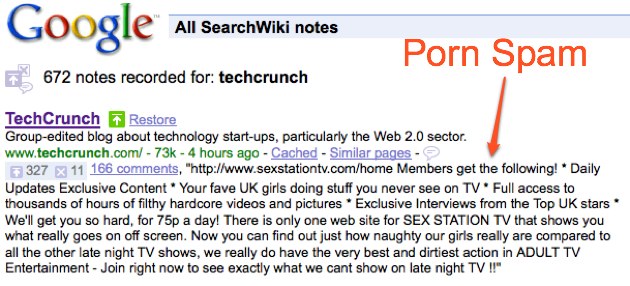
Cheers were heard across the Internet earlier today when Google's new SearchWiki search interface inexplicably vanished. Perhaps, just maybe, it was gone for good. Or at least when it returned it would have an opt out feature.

Nope. Neither. It's back and it's still impossible to get out of it short of logging out of Google entirely. Lovely comments like the one above now scar Google's once pristine search results page.

Here's how you can get rid of SearchWiki for good if you were unfortunate enough to accept it in the first place: use a Greasemonkey script created by Austrian developer Franz Enzenhofer and just click a button to turn it off. Instructions are here.

This should hold you over until Google adds an opt-out button.

ibmIBM wants to corner the market on cloud computing, from providing the physical servers that make up a cloud to offering services for those unwilling to build out their own. Today it announced plans to move further into the fog by creating a kind of Good Housekeeping Seal of Approval for cloud computing. IBM calls it the Resilient Cloud Validation program. Big Blue hopes to work with cloud providers to offer a program that reassures businesses that a cloud doesn't go down often as well as helping answer other questions that keep businesses from trusting in the cloud model.

Coincidentally (yeah, right) companies hoping to gain that seal of approval will need to work with IBM's cloud consulting practice. IBM is also announcing as part of that practice that it can help answer a question I've long bothered cloud providers with — When is it most cost effective to outsource your application to a cloud and when should you build your own, or at least buy your own, servers?

IBM has been pretty quiet about its cloud efforts. In part because it didn't want to hack off large customers buying a ton of IBM servers by competing with them. The computing giant hasn't been pushing its own cloud business until a half-hearted announcement at the end of July, about a month and half after a company exec had told me IBM didn't really want to advertise its cloud services.

While I may have doubted if IBM really "got" cloud computing in the past, a project it detailed in a press release today about a research project in China has me convinced that IBM knows exactly what the cloud is, and plans to capitalize on its name and experience to compete with Amazon for enterprise business. Check it out:

IBM's China Research Lab is piloting a newly developed cloud computing platform, codenamed Project Yun which is Chinese for "cloud," for companies to access business services, designed to make the selection and implementation of new cloud services as easy as selecting an item from a drop-down menu. With no need for back-end provisioning, the IBM platform stands to cut the time required to deliver new services dramatically. The Yun platform allocates storage, server and network resources for the customer application with zero human input, achieving top performance, availability and power utilization.

Instant provisioning with no human intervention. Right now it sounds like vaporware, but if IBM pulls it off, its cloud offerings will move from so much vapor to a competitive business.


Now, we're sure that everything's on the up and up here, but the lack of information about the TouchDiva from any source other than the makers of the TouchDiva gives us pause, especially as the product's apparently launching on December 1st. Regardless, here's what we've gathered: the device is a 15.4-inch touchscreen unit you install in your home, and, via the magical wonders of the internet, you get all the music your heart could ever desire, free of charge -- besides the $75 monthly subscription fee, of course. The Danish manufacturers claim to have "agreements with the four major music companies in the world (Warner, EMI, Sony-BMG and Universal)," giving them access to over 2 million songs. Housed inside the unit are two 125W Bang & Olufsen-manufactured speakers, and the Diva itself has just two buttons -- an on / off, and a reset, giving it a pretty stark exterior. As you can probably imagine, it's um, not cheap -- in fact, you're going to have to cough up $6,000 if you want one, and you'll have to live in Europe or Great Britain, where the device is (supposedly) about to go on sale.

Read - Danish invention will change music sales
Read - TouchDiva


According to a report from NPD, sales of cellphones have shifted in a manner which should shock and stun even a casual observer. Apparently for the first time in years, Motorola's ubiquitous RAZR has been overtaken in consumer sales... by the iPhone 3G. This is a watershed moment for handset sales in the US, marking not only a shift away from the dominant market leader, but a turn towards more complex, full-featured devices. The news comes hot on the heels of NPD's previous findings, which still placed the RAZR in the top spot -- though with ever-decreasing numbers. In that same report, the iPhone found itself in second place, but it appears that flagging interest in the inescapable dumbphone coupled with the recent iPhone PR blitz have put Apple's moneymaker into the top position. The news is also buoyed by recent reports that Apple has overtaken RIM as the number two smartphone vendor, and a J.D. Power study which found affection for the device waxing in the extreme. Overall, however, handset sales fell 15 percent year-over-year, and LG managed to snag the top brand position, with two models in the top five. Still, if there already wasn't a clear indication of the market moving towards both smartphones and touchscreen devices, this should give everyone a clearer picture of both the public's wants, and the power of Cupertino's ad-men. Full PR after the break.

FOR IMMEDIATE RELEASE

The NPD Group: iPhone 3G Leads U.S. Consumer Mobile Phone Purchases in the Third Quarter of 2008

Overall consumer mobile phone purchases declined 15 percent year-over-year

PORT WASHINGTON, NEW YORK, NOVEMBER 10, 2008 – According to The NPD Group, the leader in market research for the wireless industry, Apple's iPhone 3G surpassed the Motorola RAZR as the leading handset purchased by adult consumers in the U.S. in the third quarter (Q3) of 2008. RAZR had been ranked by NPD as the top-selling consumer handset for the past 12 quarters.

Even with stronger consumer sales of iPhone, and the mobile phone market's normal seasonal uplift after Q2, domestic handset purchases by adult consumers declined 15 percent year over year in Q3 to 32 million units. Consumer handset sales revenue fell 10 percent to $2.9 billion, even as the average selling price (ASP) rose 6 percent to $88.

Top-selling handsets and mobile phone brands

"The displacement of the RAZR by the iPhone 3G represents a watershed shift in handset design from fashion to fashionable functionality," said Ross Rubin, director of industry analysis for NPD. "Four of the five best-selling handsets in the third quarter were optimized for messaging and other advanced Internet features."

The top handset models in rank order, based on unit sales in Q3, were as follows:

1. Apple iPhone 3G
2. Motorola RAZR V3 (all models)
3. RIM Blackberry Curve (all models)
4. LG Rumor
5. LG enV2

Popular features

When it comes to the specific features that motivated U.S. consumers to purchase their handsets, 43 percent of handset buyers cited the need for a camera and 36 percent noted the ability to send and receive text messages. Mobile phones with a QWERTY keyboard experienced the greatest year-over-year rise in sales; 30 percent of handsets were sold with this feature in Q3 2008, versus just 11 percent the year prior. Also this quarter 83 percent of phones purchased were Bluetooth enabled (versus 72 percent last year), and 68 percent of phones purchased in Q3 were music enabled (versus 49 percent last year).

"A growing data divide continues in cellular handsets," Rubin said. "Those who see the value in wireless Internet access are justifying the investment, whereas voice-centric users have little incentive to upgrade, which is obviously detrimental to operators who seek to sell data plans and media-access services to their subscribers."

Methodology: NPD compiles and analyzes mobile device sales data based on more than 150,000 completed online consumer research surveys each month. Surveys are based on a nationally balanced and demographically representative sample of U.S. adults. Results are projected to represent the entire population of U.S. consumers age 18 and older.

About The NPD Group, Inc.

The NPD Group is the leading provider of reliable and comprehensive consumer and retail information for a wide range of industries. Today, more than 1,600 manufacturers, retailers, and service companies rely on NPD to help them drive critical business decisions at the global, national, and local market levels. NPD helps our clients to identify new business opportunities and guide product development, marketing, sales, merchandising, and other functions. Information is available for the following industry sectors: automotive, beauty, commercial technology, consumer technology, entertainment, fashion, food and beverage, foodservice, home, office supplies, software, sports, toys, and wireless. For more information, visit http://www.npd.com/.

;;